NewDependencies & static assets

Stop rebuilding what
you already built.

Atlas maps every React component, hook, utility, store and route in your codebase — plus dead code, npm dependencies and architecture. One free command. No config, no sign-up.

$npx codebase-atlas serve
Read the docs
localhost:4321
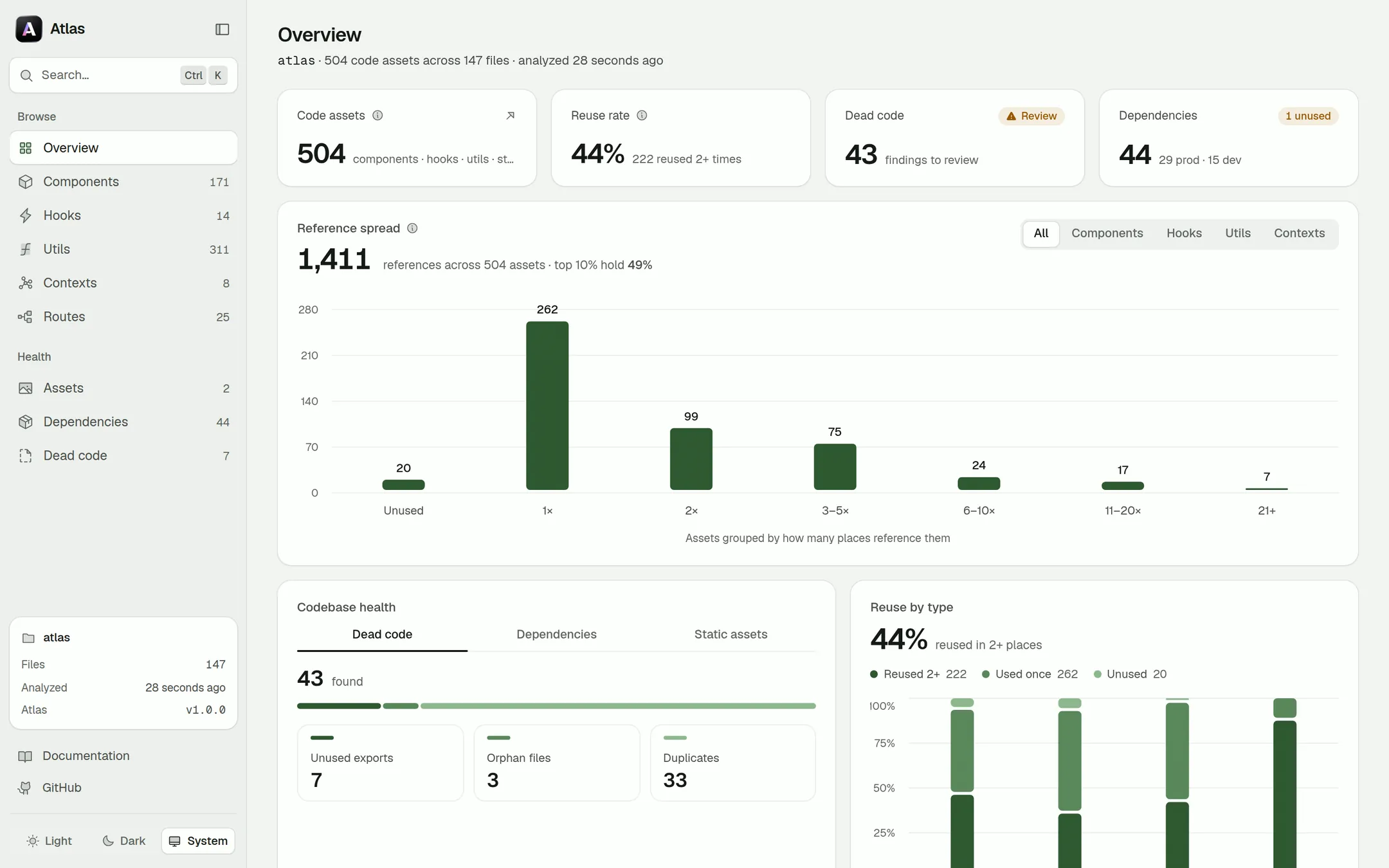
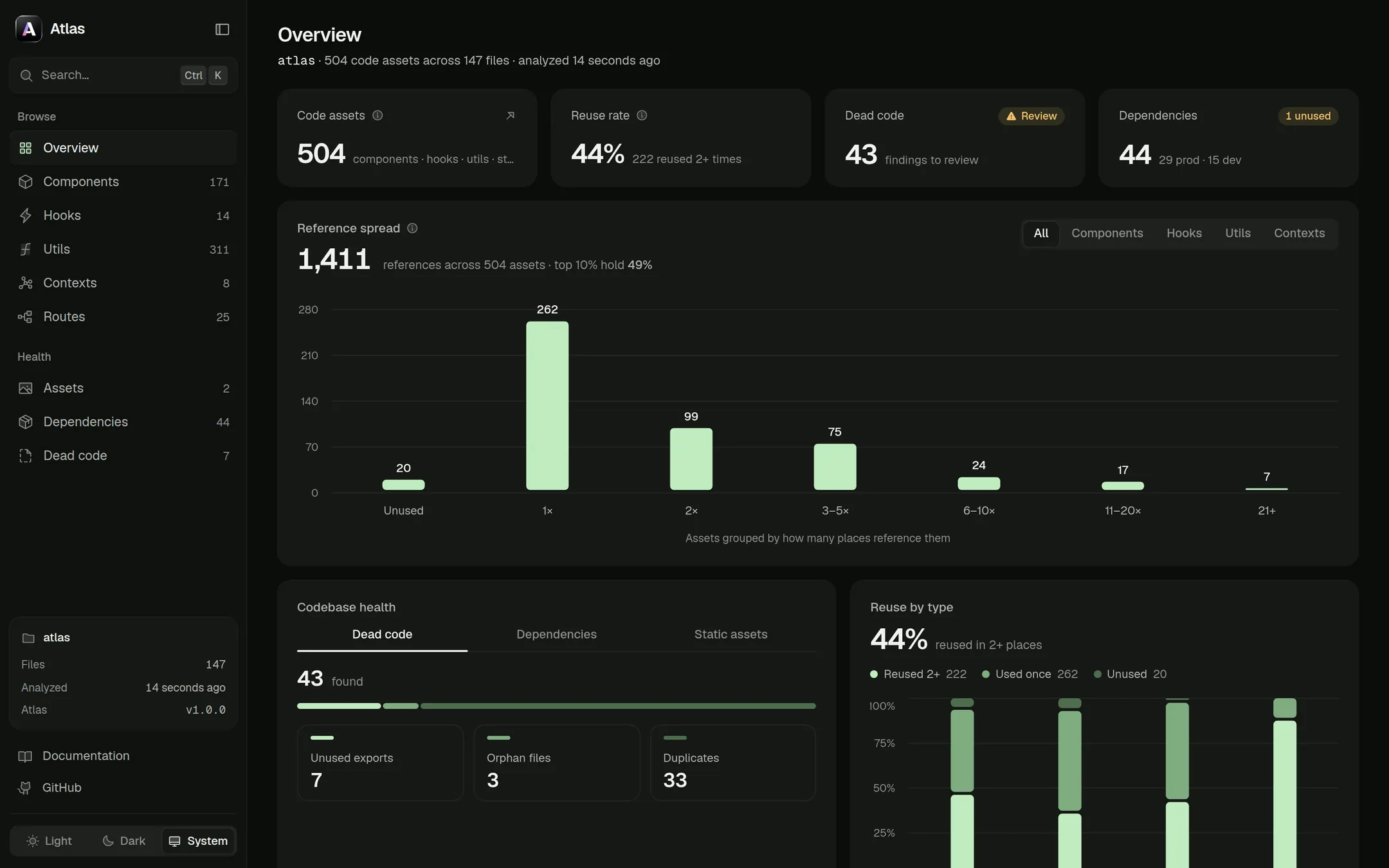
The Atlas dashboard's Overview: 504 code assets across 147 files, a 44% reuse rate, 43 dead-code findings and 44 dependencies, above a chart of how often each asset is referenced.
6asset kinds, found automatically
7dashboard views, one snapshot
12JSON files for CI and tooling
0config files. Really.
Codebase discovery

Your whole frontend, found in one scan.

Think Storybook, Compodoc and Madge — generated for you. Atlas reads the TypeScript AST, so it works as well on a tidy design system as on a sprawling legacy monorepo.

Reads intent, not folders.

Every export is classified by what the code does, using the TypeScript type checker. Move a file anywhere — a hook is still a hook.

// src/cart-state.ts
hook    useCart       → returns { items, add }
util    formatPrice   → pure · formatter
store   cartStore     → zustand · create()

Six kinds. One classifier.

  • Components
  • Hooks
  • Utilities
  • Contexts
  • Stores
  • Routes

Every reusable building block in your React app, detected the same way.

Dead code, caught red-handed.

3

unused exports, 2 orphan files and every duplicate — lined up for one clean-up PR.

New

Know every npm package you ship.

Installed version, how many files import it, and a live check for updates. workspace:, file: and git installs are labelled — never guessed.

reactUp to date
zustand→ 5.0.1
@acme/uiLocal
lodashUnused
New

Static asset audit

That 4 MB hero image nobody uses? Found on the first scan.

Every image, font, video and PDF — with its size, dimensions and every reference from code, CSS and markup. Previews stream from disk, so nothing leaves your machine.

See what depends on what.

Checkout
├─ Button
│  ├─ Icon
│  └─ Spinner ─ cn()
└─ useCart ─ cartStore

Architecture that explains itself

Module boundaries, your shared layer and the imports that cross the line — each with a fix.

Built for monorepos

npm, Yarn and pnpm workspaces, Turborepo and Nx — detected automatically, aliases resolved per package.

Leaves no trace

Everything lives in one gitignorable .atlas/ folder. Publish it as a static site with atlas export.

The dashboard

A living map of your codebase.

Run atlas serve and a local dashboard opens in seconds — 7 views over one snapshot, so every number agrees with every other.

localhost:4321
The Overview view of the Atlas dashboard.

Overview. Project stats at a glance — asset counts, framework detection, most-used assets and the health of the codebase.

How it works

From npx to insight in one command.

  1. 01

    Scan

    Run npx codebase-atlas serve. Every file is parsed with the TypeScript compiler, with path aliases and workspaces resolved.

  2. 02

    Classify

    Each export is sorted by what it does — component, hook, util, context, store or route — never by the folder it lives in.

  3. 03

    Explore

    A local dashboard opens in your browser, and the same snapshot lands in .atlas/ as JSON for CI and tooling.

~/my-app — zsh
$ npx codebase-atlas serve
Scanning project… (147 files)
✓ Components 171 ✓ Hooks 14 ✓ Utils 311
✓ Contexts 8 ✓ Routes 25
✓ Dependencies 44 packages · 7 updates available
✓ Static assets 2 files · 3.5 KB on disk
⚠ 7 unused exports · 3 orphan files · 33 duplicate candidates
Most used: cn 78× · Badge 48× · Card 32×
Wrote .atlas/ — 12 JSON files
→ Dashboard ready at http://localhost:4321
$
Outputs

Your codebase, as clean JSON.

Every scan writes a plain-JSON snapshot to .atlas/. Diff it in pull requests, fail CI on new dead code, or pipe it into your own tools.

Output reference
components.json

Every detected component with props, component kind and source location.

hooks.json

Custom hooks with parameters, return shape and the hooks they call.

utils.json

Utilities classified as function, validator, formatter, helper or constant.

contexts.json

React contexts and state stores (Redux, Zustand, Jotai, MobX, …).

routes.json

Routes resolved per router kind, with their components and path params.

graph.json

The dependency graph — nodes plus imports / renders / uses / provides edges.

dead-code.json

Unused exports, orphan files and duplicate candidates.

architecture.json

Folder structure, module boundaries, the shared layer and boundary violations.

dependencies.jsonNew

Declared npm packages with kind, resolved version, install source and import counts.

static-assets.jsonNew

Static files on disk with kind, size, dimensions, public URL and the places that reference them.

search.json

The prebuilt fuzzy-search index used by atlas search and the dashboard.

analysis.json

The full snapshot every other command reads back from.

AI, on your terms

Smart with AI. Complete without it.

Atlas documents every asset offline — no API keys, no network calls, no code leaving your laptop. Want richer docs? Hand the same context to your AI agent.

  • Offline-first docs. Built from real AST facts, so signatures are never hallucinated.
  • Optional AI pass. atlas ai has Claude Code, Codex or Cursor describe every asset.
  • Agent-ready context. Give your coding agent a map of what exists, so it reuses instead of reinventing.
atlas ai
$ atlas ai --agent claude --model haiku → Handing 135 assets to Claude Code… ✓ Claude Code described 135/135 assets in 2m 41s ✓ Button Renders a 4-variant button with a loading state ✓ useDebounce Delays a value by `delay` ms i Read-only agent, batched and resumable, no API keys
The toolbox

8 commands. One toolbox.

Analyze, search, graph, export, watch — every command works on any React, Next.js or Vite project, with nothing to configure and nothing committed to your repo.

Or just run atlas.

No flags to remember: in a terminal, Atlas opens a menu over every command and asks only for what the action needs — including an AI pass with the coding agent you already have.

atlas
$ atlas ┌ atlas v2.0.0 ◇ Project to scan · . ◆ What do you want to do? │ ● Open the dashboard (analyze + browse) │ ○ Describe assets with AI (via Claude Code) │ ○ Analyze · Search · Dead code · Graph… └

Stop rebuilding.
Start reusing.

Free and open source under MIT. No config, no sign-up, nothing written to your repo.

$npx codebase-atlas serve
Star on GitHub